













How to Choose Genshin Impact Keycaps?
For PC players of Genshin Impact, a gaming keyboard and keycaps are essential accessories. Today, let me guide you on how to choose Genshin Impact keycaps.
Which keyboards support keycap replacement?
Most mechanical keyboards support keycap replacement. Whether you can replace the keycaps depends on understanding if the switches and the spacebar length are compatible.

Switch Type: Requires Cross-shaped Stem
Keyboards with switches that have a cross-shaped stem can have their keycaps replaced.
Spacebar Length: 6.25U and 7U
Most mass-produced mechanical keyboards and DIY kits use 6.25U or 7U spacebars, and some Alice layout keyboards use split spacebars. Most keycap manufacturers follow this standard, so there are many keycap options available.

Keyboards like Magic Keyboards, membrane keyboards, and static-capacitive keyboards such as REALFORCE Keyboard do not support keycap replacement. This is because they either lack switches or have incompatible stems. Only keyboards with cross-shaped stems allow for keycap replacement.
What are the different keycap profiles?
The term "keycap profile" refers not just to the physical height of a single keycap, but to the overall shape and design of the entire set. More precisely, a "profile" describes a collection of parameters that define a keycap set's form. Keycap profiles have evolved significantly. Starting with the original Cherry profile, developments by keycap manufacturer SP and keyboard OEMs led to profiles like SA, DSA, and OEM. Further innovation by other companies introduced profiles such as KAT, ASA, XDA, and MDA. Today, the variety is truly flourishing.
| Keycap Profiles | Characteristics |
| Cherry Profile | Keycaps have varying heights across different rows, forming a stepped or staggered profile designed to be ergonomic. |
| OEM Profile | Slightly taller than Cherry profile keycaps (approximately 1-2mm higher), with a bit more curvature. Excellent compatibility. |
| SA | Spherical concave surface, produces a loud sound. |
| MDA | Spherical concave, larger contact surface, suitable for typing. |
| DSA | All rows are the same height, with spherical concave tops, resulting in a visually very uniform appearance. |
| XDA | All keycaps are the same height, with no stepped differences. The larger surface area makes them prone to accidental presses. |
| KAM | Uniform height, spherical profile. |
| MOA | Uniform height, extremely rounded spherical keycaps. |

For gamers, the recommended Genshin Impact keycap profiles are Cherry Profile and OEM Profile.

Cherry Profile offers speed and efficiency, with shorter finger travel for quicker keystrokes and reduced fatigue during long gaming sessions.
OEM Profile is the most balanced and universal choice. Its moderate height provides reasonable finger travel and clear tactile feedback, making it the default option for almost all gaming keyboards—no adjustment period needed.
Keycap Material
The material of the keycaps is crucial, as it not only affects the gaming experience but also largely determines the aesthetic appeal. Currently, keycaps are primarily made from the following materials:

ABS (Acrylonitrile Butadiene Styrene)
ABS plastic is easy to mold, with good flow properties and excellent electrical insulation. For keycap manufacturing, ABS is easy to process, convenient to color, and has a good glossy finish. Its drawback is relatively lower hardness and wear resistance. Over time, the surface can become smooth and shiny, a phenomenon commonly referred to as "keycap shine."

PBT (Polybutylene Terephthalate)
PBT is a high-temperature resistant, high-hardness material, often praised as "white rock." Keycaps made from PBT are naturally hard and wear-resistant. Additionally, most PBT keycaps undergo a spark-erosion surface treatment, creating a heavier, grainy texture that further enhances their durability.

POM (Polyoxymethylene)
POM, also commonly known as "acetal" or "Delrin," offers excellent wear resistance, self-lubricating properties, and high toughness. Its harder composition allows it to maintain its original surface texture for a very long time without becoming polished or smooth. A drawback of POM is its limited compatibility with printing techniques and relatively high shrinkage rate.

Materials like metal, resin, and clay can also be used to make keycaps. However, due to their material properties and cost, they are primarily used for crafting artisan keycaps. These keycaps are often made using complex processes like CNC machining or hand-crafted resin pouring. They are typically vibrant in color, visually striking, or intricately detailed, creating a distinct contrast with standard keycaps and allowing for high personal expression.
Keycap-Compatible Keyboard Layouts

100% Layout
The most common keyboard layout is the standard 104-key configuration, typically the default for office computers. It includes all the commonly used keys. Another prevalent 100% layout is the 108-key version, which adds four media keys above the number pad compared to the 104-key layout, and is more common on gaming keyboards.

80% Layout
This layout is typically represented by 87-key and 84-key configurations. Compared to the standard layout, it omits the number pad and is often referred to as the TKL layout (short for TenKeyLess). Apart from the missing number pad, other keys and functions remain largely the same, maintaining both office productivity and gaming suitability.

75% Layout
This layout typically consists of 80-84 keys. Based on the 80% layout, it removes some function keys and further reduces the keyboard's size by shortening the right Shift key and rearranging the keys on the right side.

65% Layout
This layout usually comprises 65-68 keys. Building on the 75% layout, it removes the F-row, reducing the keyboard's width for enhanced portability and a more compact, refined appearance.

Genshin Impact Keycap Recommendations
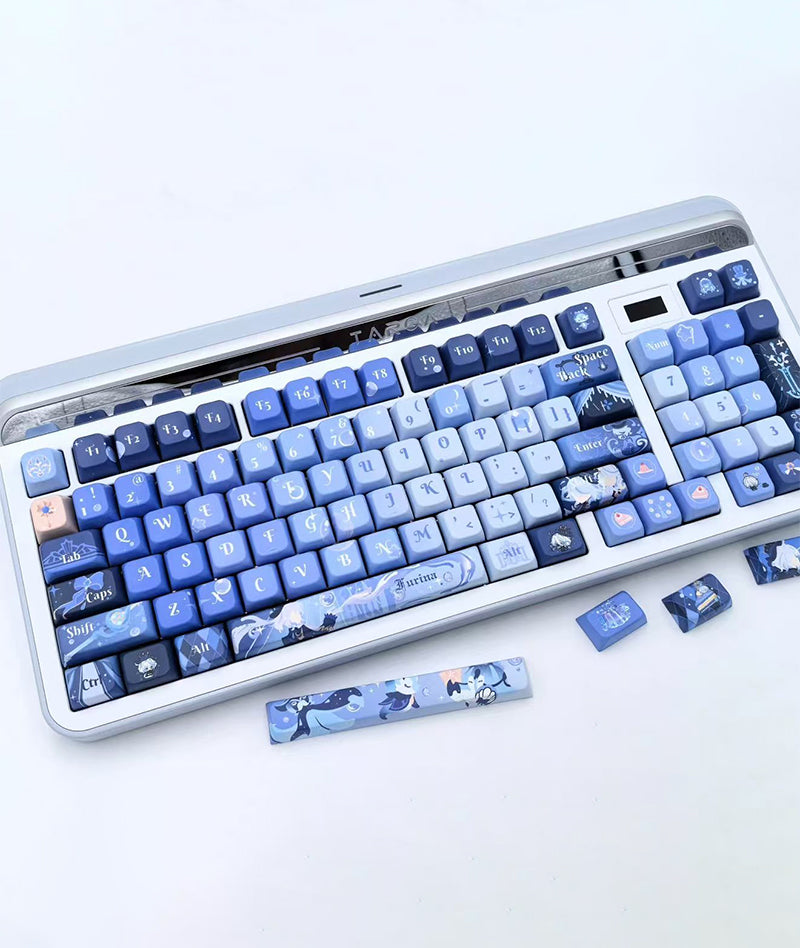
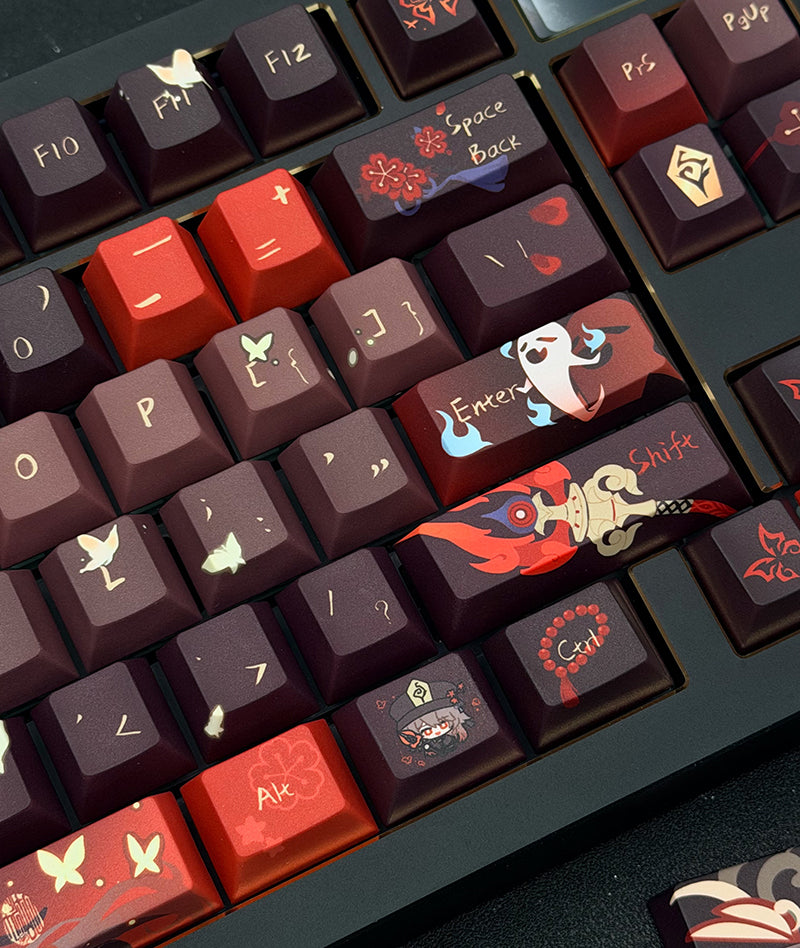
We bring Travelers a variety of popular Genshin keycaps, featuring beloved characters like Furina, Venti, Arlecchino, Flins, and the Raiden Shogun. Each keycap set is meticulously designed, crafted from durable PBT material using a sublimation printing process. The colors are vibrant and saturated, offering not only a super high aesthetic appeal but also a comfortable, wear-resistant feel. They perfectly balance beautiful design with everyday practicality.


How to install keycaps?

Step 1: Prepare Tools and Accessories
Keycap Puller: This is an essential tool for removing keycaps. It helps prevent damage to the keycaps or loosening of the switch stems. If you don't have one, a paperclip can be used as a substitute (see image).
Cleaning Tools: Take the opportunity while changing keycaps to clean accumulated dust from the keyboard using a brush or cleaning cloth.

Step 2: Remove the Old Keycaps
Align the keycap puller with both sides of the keycap and gently but firmly pull upwards to detach it from the switch.
For larger keys (like Space, Enter, Shift), note that they may have a stabilizer bar underneath. Apply even pressure and work slowly when removing them.
Important Notes for Special Keys:
Be careful not to bend the stabilizer bar on larger keys, as this can prevent proper reinstallation or cause an uneven feel.
For keys like the spacebar that have a metal stabilizer wire, first disengage the wire from the clips on the keycap before lifting the keycap off.

Step 3: Clean the Keyboard Base
Use a small brush to clean dust from the keyboard base. For stubborn grime, you can wipe gently with a cotton swab dipped in a small amount of rubbing alcohol, but ensure it is completely dry before proceeding.
Step 4: Install the New Keycaps
Open the new keycap set and select the corresponding keys based on your keyboard's layout (e.g., ANSI, ISO, or others).
Align the keycap with the top of the switch stem and press down gently with your finger to secure it in place.
For larger keys (like the spacebar), first snap the metal stabilizer wire into the clips on the new keycap, then install it back onto the keyboard.
That's the complete guide to keycaps. Do you now know how to choose your keycaps?
Genshin Impact Keycaps Recommendations


- $99.90 USD
- $99.90 USD
- Unit price
- per


- From $29.90 USD
- From $29.90 USD
- Unit price
- per


- From $54.90 USD
- From $54.90 USD
- Unit price
- per


- $95.90 USD
- $95.90 USD
- Unit price
- per


- From $52.90 USD
- From $52.90 USD
- Unit price
- per


- $95.90 USD
- $95.90 USD
- Unit price
- per


- $95.90 USD
- $95.90 USD
- Unit price
- per


- $82.90 USD
- $82.90 USD
- Unit price
- per


- $95.90 USD
- $95.90 USD
- Unit price
- per


- From $89.90 USD
- From $89.90 USD
- Unit price
- per


- $89.90 USD
- $89.90 USD
- Unit price
- per


- $89.90 USD
- $89.90 USD
- Unit price
- per


- $92.90 USD
- $92.90 USD
- Unit price
- per


- $95.90 USD
- $95.90 USD
- Unit price
- per


- $89.90 USD
- $89.90 USD
- Unit price
- per


- $109.90 USD
- $109.90 USD
- Unit price
- per


- $95.90 USD
- $95.90 USD
- Unit price
- per


- $89.90 USD
- $89.90 USD
- Unit price
- per


- $95.90 USD
- $95.90 USD
- Unit price
- per


- $82.90 USD
- $82.90 USD
- Unit price
- per